
JavaScriptReactAPI Integration20 PointsMid-level
Country Quiz
Most of the time, API is optimized for displaying a set of data, but other times, we need to modify the data and use it for our purpose. In this challenge, you will work with country API and build a country quiz app.
Learning Goals
By completing this challenge, you will:
- •Build a country quiz app.
- •Work with country API to generate quiz questions.
- •Display quiz questions with multiple options.
- •Provide immediate feedback on user's answer.
- •Allow users to navigate between questions.
- •Show a congratulations page with the quiz result.
Requirements
You should create a web page that includes the following elements:
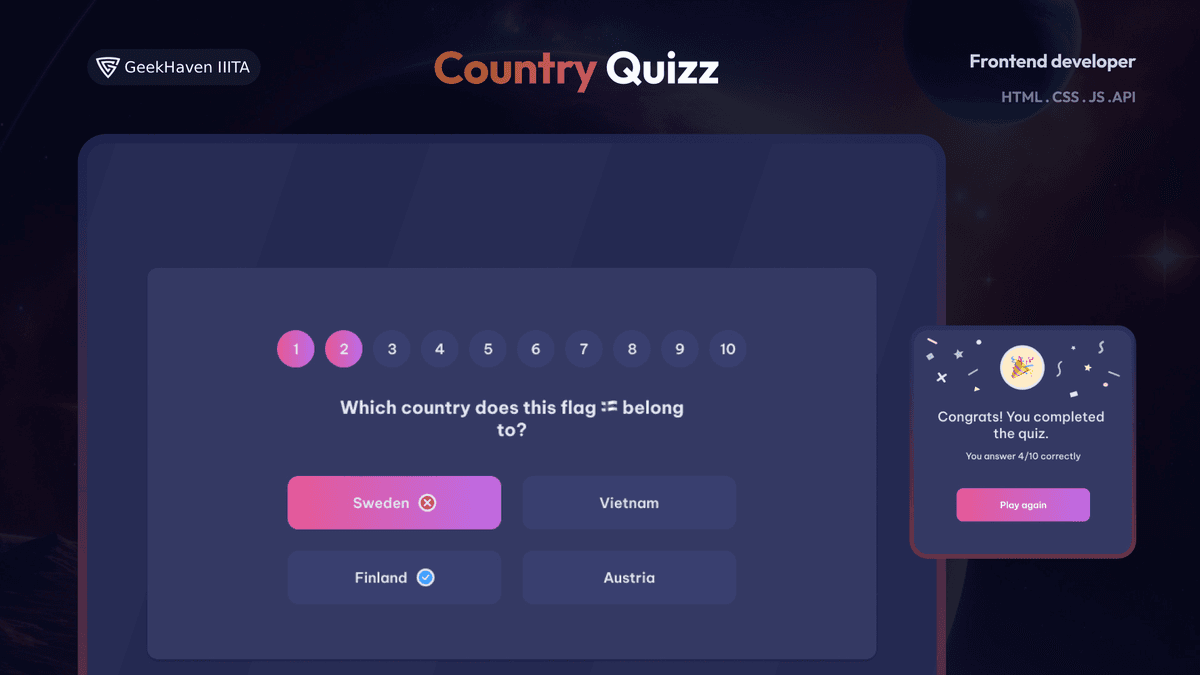
- •Create a country quiz that matches the given design.
- •By default, generate 10 questions about countries with the given API.
- •In each question, users should see 4 options.
- •When users select an answer, they should get the correct answer immediately with according indicators in the design.
- •User can navigate to any questions.
- •When users answer all 10 questions, they should see a congratulations page with the result and choose to play again.
- •Deploy the solution and submit Repository URL and Demo URL.
Technical Details
To fetch country data for the quiz questions, you can use the WorldRanks API. The API provides various endpoints for retrieving country data.
To generate 10 quiz questions, you can make a GET request to the following endpoint:
Endpoint:
https://restcountries.com/v3.1/all?limit=10For bonus points, you can consider using a frontend framework like React or Vue.js to build this challenge.
Instructions for Using a Frontend Library for Country Quiz Challenge
1. Set Up Your Project:
- Use Create React App to set up a new React project.
2. Create Components:
- Create a Quiz component to display the quiz page.
- Create a Question component to render each question.
- Create a Congratulations component to display the result page.
3. Fetch Data:
- Use the fetch API or a library like Axios to retrieve country data from the provided API.
4. Render Components:
- Use the Quiz component to render the quiz page.
- Use the Question component to render each question.
- Use the Congratulations component to render the result page.
5. Quiz Functionality:
- Generate 10 quiz questions using the country data.
- Display each question with 4 options.
- Provide immediate feedback on user's answer.
- Allow users to navigate between questions.
6. Result Page:
- When users answer all 10 questions, display a congratulations page with the result.
- Allow users to choose to play again.
7. Deployment:
- Deploy your solution and provide the Repository URL and Demo URL for submission.
Example Code
Quiz Component
javascript
// Quiz

import React, { useState, useEffect } from "react";

function Quiz() {
  const [questions, setQuestions] = useState([]);
  const [currentQuestion, setCurrentQuestion] = useState(0);
  const [userAnswers, setUserAnswers] = useState([]);
  const [showResult, setShowResult] = useState(false);

  useEffect(() => {
    // Fetch quiz questions from the API
  }, []);

  const handleAnswer = (questionIndex, answerIndex) => {
    // Update user's answer for the current question
  };

  const handleNextQuestion = () => {
    // Move to the next question
  };

  const handlePrevQuestion = () => {
    // Move to the previous question
  };

  const handleFinishQuiz = () => {
    // Calculate the quiz result and show the result page
  };

  return <div className="quiz">{/* Render quiz components */}</div>;
}

export default Quiz;
Question Component
javascript
// Question

import React from "react";

function Question({ question, userAnswer, handleAnswer }) {
  return <div className="question">{/* Render question and options */}</div>;
}

export default Question;
Congratulations Component
javascript
// Congratulations

import React from "react";

function Congratulations({ correctAnswers, totalQuestions, handlePlayAgain }) {
  return (
    <div className="congratulations">
      {/* Render congratulations message and result */}
    </div>
  );
}

export default Congratulations;
Tech Stack
For this project, you have the flexibility to use HTML, CSS, and JavaScript or a Front-end library like React, Vue, etc. Consider the learning curve and additional setup required when choosing a library.
User Stories
Acceptance Criteria Checklist
Create a country quiz that matches the given design.
By default, generate 10 questions about countries with the given API.
In each question, users should see 4 options.
When users select an answer, they should get the correct answer immediately with according indicators in the design.
User can navigate to any questions.
When users answer all 10 questions, they should see a congratulations page with the result and choose to play again.
Deploy the solution and submit Repository URL and Demo URL.