
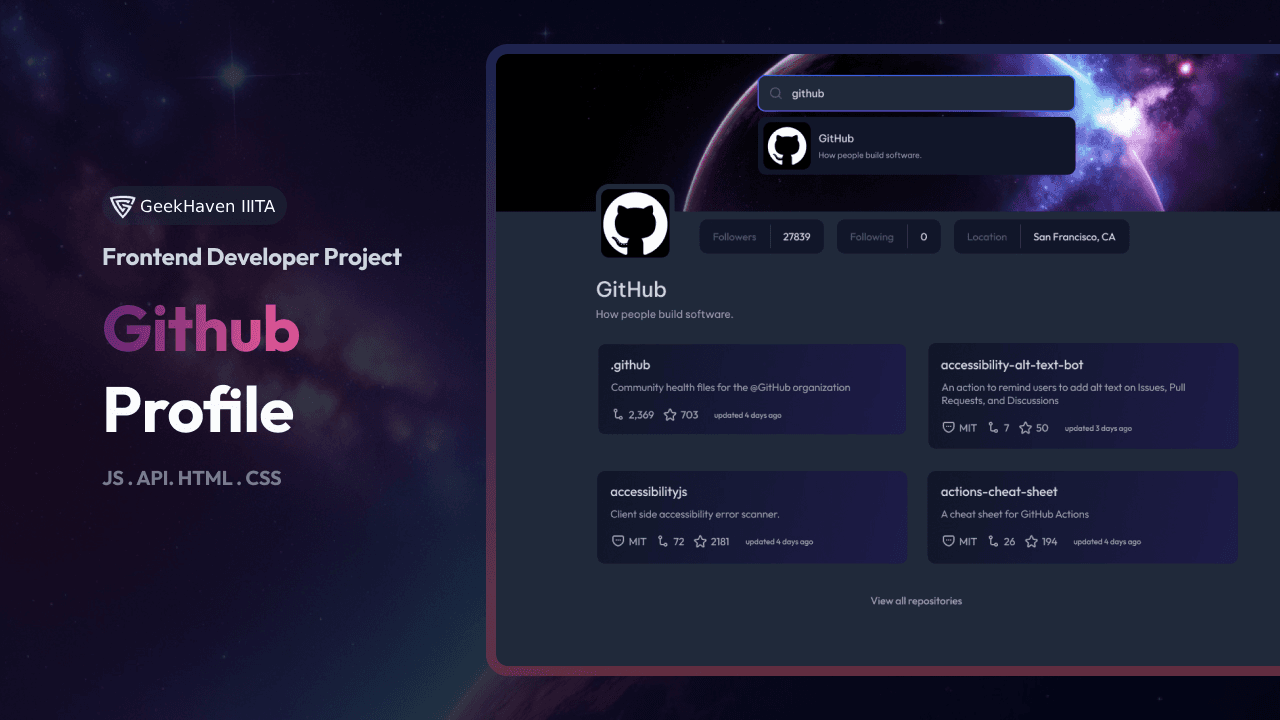
GitHub Profile
The challenge requires creating a Github Profile search application that utilizes multiple API endpoints. The Github Profile search app requires the use of multiple APIs, such as the Github REST API, which returns information about a repository as a JSON.
Learning Goals
By completing this challenge, you will:
- •Practice your JavaScript skills by creating a Github Profile search application.
- •Learn how to create a Github profile page that matches a given design.
- •Improve your HTML, CSS, and JavaScript skills.
- •Enhance your ability to create interactive web applications.
Requirements
You should create a web page that includes the following elements:
- •Create a Github profile page that matches the given design.
- •Use HTML to create the basic structure.
- •Add inputs, images, buttons, according to the design.
- •Use JavaScript to add interactivity.
- •Users should be able to search for user by user name.
- •User should be able to see the number of followers, following, and location.
- •User should be able to see the repositories that profile has.
- •User should be able to see the details of each repository.
- •When users select repository card, they should be able to see the repository page in the new tab.
- •Ensure the page is responsive on different screen sizes.
- •Deploy the solution and submit both the Repository URL and Demo URL.
Technical Details
To retrieve Github profile information, you can use the Github REST API. This API returns information about a repository as a JSON. You can utilize this API to fetch the necessary data for your Github Profile search application.
https://api.github.comFor example, you can get a GitHub profile by using fetch:
fetch("https://api.github.com/users/:username")
  .then((response) => response.json())
  .then((data) => {
    console.log(data);
  })
  .catch((error) => {
    console.log(error);
  });
Remember to include the necessary HTML elements and CSS styles to create the Github Profile search application according to the given design.
background: linear-gradient(95deg, #111729 3%, #1d1b48 99.61%);Instructions for Using a Frontend Library
If you choose to use a frontend library like React, Vue, or Svelte for this project, follow these additional instructions:
1. Set Up the Frontend Library:
- Install the necessary dependencies for the library of your choice.
- For example, if you're using React, you can use Create React App to set up a new React project.
- Follow the documentation of the library to set up your project correctly.
2. Create Components:
- Use the library's component system to create reusable components for the input field, profile display, and repository list.
- Organize your components in a logical folder structure.
3. Fetch GitHub Profile Data:
- Utilize the library's built-in HTTP client or a third-party library (such as Axios) to make API requests to the GitHub API based on the entered username.
- Handle the API response and update the component's state accordingly.
4. Handle State:
- Use the library's state management system (such as React's
useStateanduseEffecthooks) to manage state and side effects. - Update the component's state when necessary, such as when fetching profile data or handling user interactions.
5. Display Profile Information:
- Render the user's profile information, including followers, following, location, and repositories, using the library's templating or JSX syntax.
// Example using React
import React, { useState, useEffect } from "react";
import axios from "axios";

function App() {
  const [username, setUsername] = useState("");
  const [profile, setProfile] = useState(null);
  const [repos, setRepos] = useState([]);

  const fetchProfile = async () => {
    // Fetch profiles and set correct values
  };

  // Render your components
  return <div></div>;
}

export default App;
Remember to consult the documentation of the specific frontend library you choose for more detailed instructions on how to use it effectively.